6. OptoPad: optogenetic stimulation
OptoPad lights LEDs over individual flies while FlyPad measures their feeding. It works in two modes:
- Closed loop: the LED responds to the fly’s own feeding. For example, a fly is stimulated whenever it starts licking the left food.
- Open loop: the LEDs follow a timed schedule, independent of behaviour.
Up to 4 OptoPads can run together. Each drives one block of 24 FlyPad channels (12 flies). Every fly has its own LEDs in four colours: blue, red, green and amber.
Flies for optogenetics
- Prepare a 100 mM all-trans-retinal stock in ethanol.
- Add it to cooled (60 °C) fly food in dim light: 1:500 (0.2 mM) for rearing, or 1:250 (0.4 mM) for at least 3 days before testing.
- Keep retinal food and flies in the dark.
- Include no-LED controls. Cover the arenas that must stay dark.
- For closed-loop learning experiments, run both a left food triggers the LED and a right food triggers the LED version, and average them to cancel side bias.
Safety: do not look directly into the LEDs.
OptoPad card
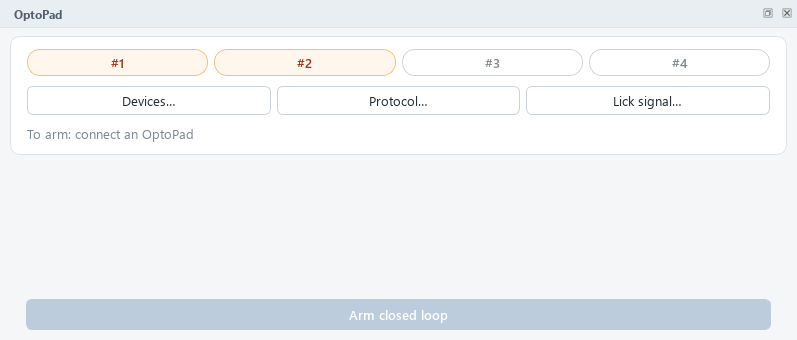
The chips #1–#4 show each OptoPad at a glance:
| Chip | Meaning |
|---|---|
| grey | Not used |
| orange | Ticked for use, not connected |
| green ✓ | Online |
Clicking a chip opens Devices…. Protocol… edits what the LEDs do; Lick signal… helps choose the lick threshold. Arm closed loop starts stimulation.
1. Connect the OptoPads: Devices…
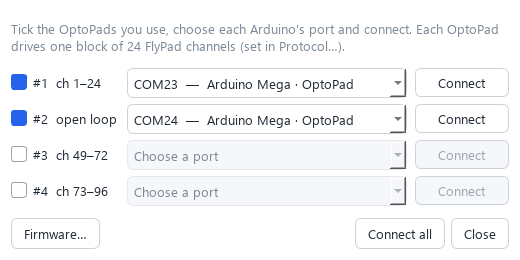
- Tick each OptoPad you use. Its row shows which FlyPad channels it covers, or open loop.
- Choose its port. Arduino Megas are recognised and suggested automatically, a different one for each OptoPad. A board you have used before is found again by its serial number, even if Windows gives it a new COM number.
- Click Connect (or Connect all). The button turns green, Online ✓.
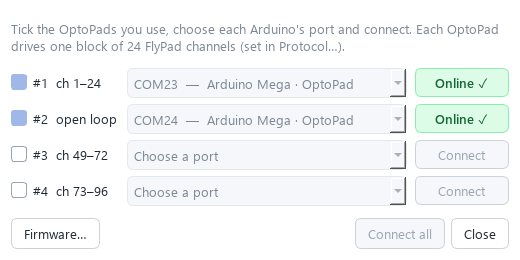
If a notice says Old firmware, click Update (about 10 s). With current firmware the board times the LED pulses itself, precise to under 0.2 ms. See Maintenance.
2. Set the protocol: Protocol…
There is one tab per OptoPad. At the top, choose the Mode and tick Use this OptoPad.
Closed loop (lick-triggered)
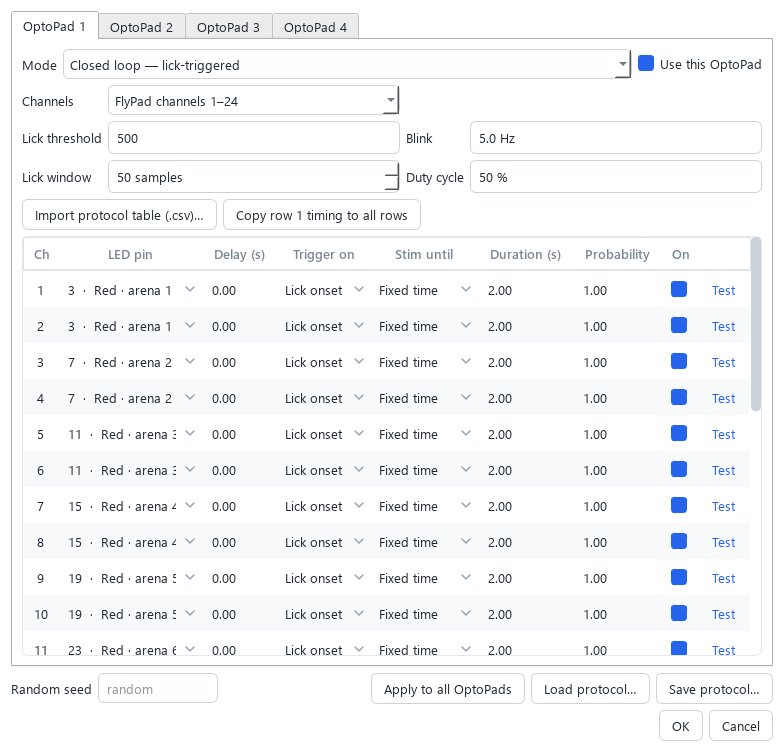
Board settings:
| Setting | Meaning |
|---|---|
| Channels | Which block of 24 FlyPad channels this OptoPad watches (1–24, 25–48, 49–72, 73–96) |
| Lick threshold | Licking is detected when the summed signal change over the lick window exceeds this. Typical: 500 (OptoPads 1–2), 120 (OptoPads 3–4). Use Lick signal… to choose it |
| Lick window | Samples summed for lick detection. 50 samples = 0.5 s |
| Blink | LED blink frequency during stimulation, in Hz |
| Duty cycle | Fraction of each blink cycle the LED is on; 100 % = continuous light |
One row per channel:
| Column | Meaning |
|---|---|
| LED pin | The LED this channel switches (colour · arena), or No stimulation: the channel is recorded but never lights an LED, e.g. for controls |
| Delay (s) | The licking state must be stable this long before the LED reacts |
| Trigger on | Lick onset (the fly starts licking) or Lick offset (it stops) |
| Stim until | Fixed time: on for Duration. While licking: on as long as the licking that triggered it continues |
| Duration (s) | Stimulation length for Fixed time |
| Probability | Chance (0–1) that a trigger actually stimulates. Below 1, the other triggers are catch trials (see below) |
| On | Untick to disable this channel |
| Test | Lights this LED for 1 s (the OptoPad must be connected) |
- Copy row 1 timing to all rows copies delay, duration, probability and trigger settings to every channel.
- Import protocol table (.csv)… reads a protocol table from earlier setups.
Open loop (timed schedule)
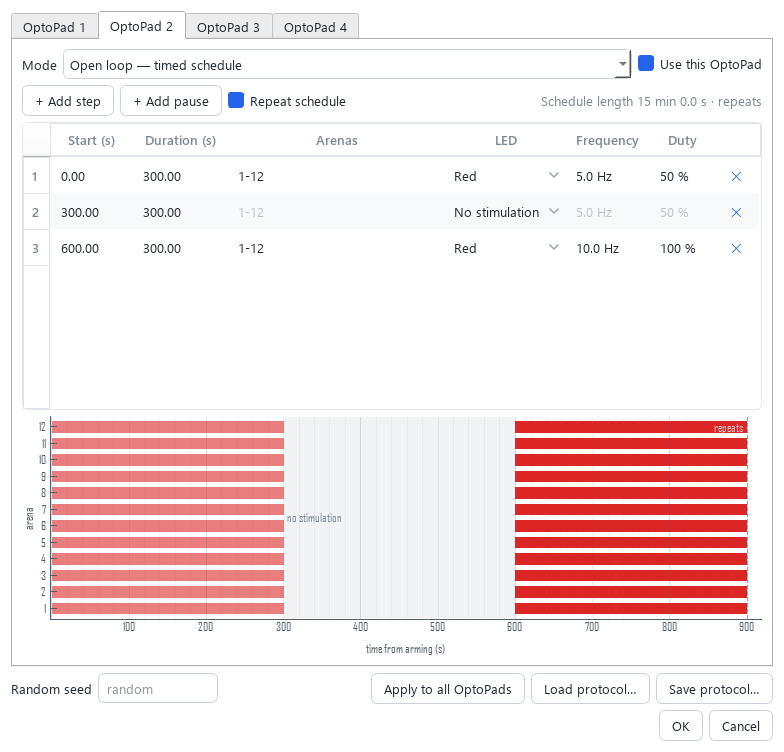
The schedule is a list of steps, timed from the moment you arm:
| Column | Meaning |
|---|---|
| Start (s) / Duration (s) | When the step starts and how long it lasts |
| Arenas | Which of the 12 arenas: 1-12, 1,3,5-7… |
| LED | Red, Blue, Green, Amber, or No stimulation |
| Frequency / Duty | Blink rate and on-fraction (100 % = continuous) |
- + Add step appends a step that starts when the previous one ends.
- + Add pause appends a period without stimulation.
- Repeat schedule loops the schedule.
- The timeline below shows the whole schedule; pauses appear as grey bands.
For all modes
- Apply to all OptoPads copies the settings shown to every other OptoPad. Each keeps its own channel block and Use tick.
- Save protocol… / Load protocol… store and reuse protocols. Ports are not stored, so a protocol works on any PC.
- Random seed: fix it to make probabilistic stimulation reproducible.
3. Choose the lick threshold: Lick signal…
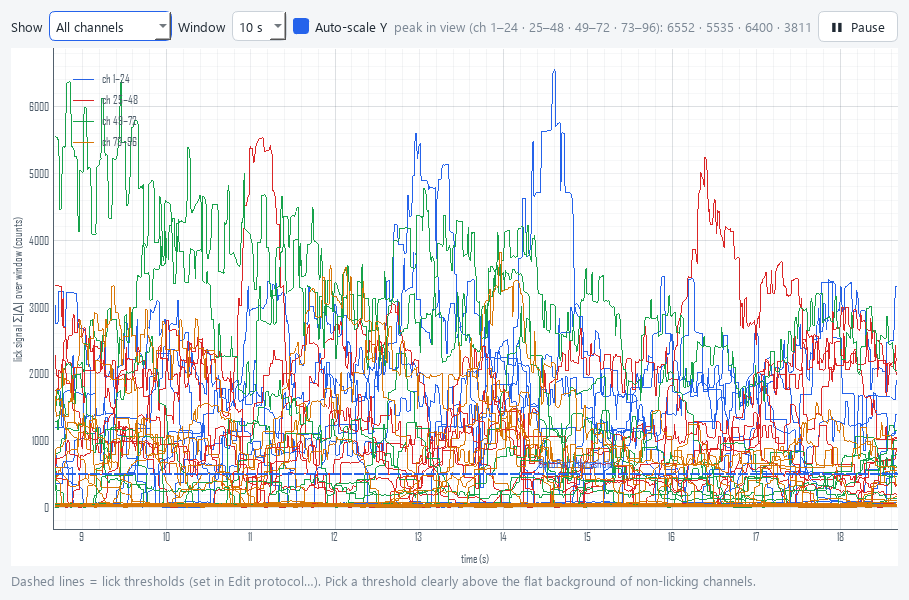
This window overlays the lick-detection signal of all channels, with the thresholds as dashed lines. It works as soon as acquisition runs, even before arming. Choose a threshold clearly above the flat background of flies that are not licking.
4. Arm
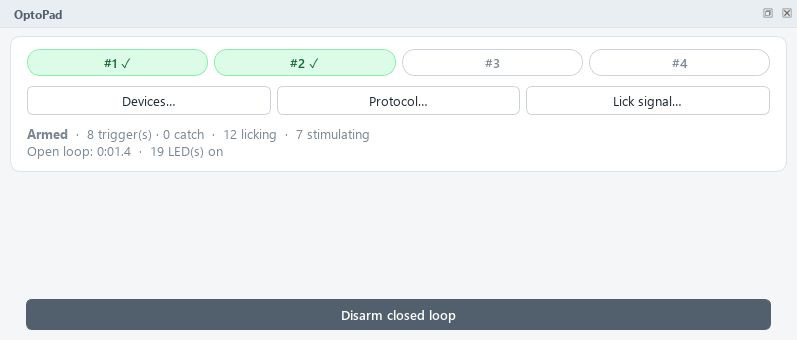
With acquisition running and at least one OptoPad online, click Arm closed loop. The card shows the number of triggers and catch trials, how many flies are licking or being stimulated, and the open-loop time. Disarm closed loop stops all stimulation.
Built-in safety:
- If FlyPad data stop for more than 0.3 s, all LEDs switch off.
- An OptoPad that loses its USB connection reconnects by itself and resumes.
- Every stimulation event is logged, with its frame number, in the
…_events.csvfile next to the recording.
Catch trials: stimulation vs no stimulation
With a Probability below 1, the closed loop draws at every trigger moment whether to stimulate. The moments where the draw said no are catch trials: the fly did the same thing, but the LED stayed off. Comparing the two shows the effect of the light itself.
- A stim period runs from the trigger until the LED switches off: after Duration, or when licking stops with While licking.
- A catch period is the same span after a catch trial: when the LED would have been on with probability 1. A real trigger during a catch period ends it and starts a stim period.
- The analysis compares them automatically (see Analyze). Use a probability of e.g. 0.5 to get as many catch trials as stimulations.
The …_events.csv columns are frame, time_s, event, optopad, channel, pin, value:
| event | Meaning |
|---|---|
armed / disarmed |
The closed loop was armed / disarmed |
trigger |
A channel triggered and the LED was switched on (channel, pin) |
catch |
A channel triggered but the random draw said no |
stim_on / stim_off |
The channel’s stim period starts / ends |
catch_on / catch_off |
The channel’s catch period starts / ends |
led |
An LED pin switched on (1) or off (0), when the PC times the blinking |
train_start / train_stop |
A blink train sent to the OptoPad (firmware-timed blinking) |
step |
Open loop: a schedule step started |
frame is the frame of the recording (0-based) at which it happened; time_s = frame / 100.