11. Firmware and maintenance
OptoPad firmware
The OptoPad controllers (Arduino Mega) run the OptoPadFirmata v2 firmware, which is included in FlyPad Acquisition. With it, the board times the LED pulses itself, precise to under 0.2 ms.
When a connected OptoPad has older firmware, the app says so (Old firmware — …) and offers Update. One click installs the current firmware and reconnects, in about 10 s.
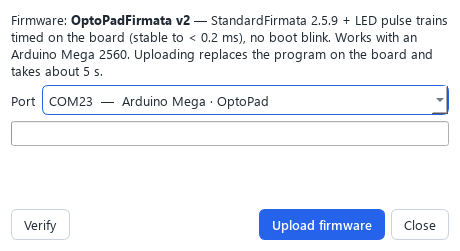
You can also check or install it by hand: Tools → OptoPad firmware… (or Firmware… in Devices):
- Choose the OptoPad’s port.
- Verify compares the board’s program with the current firmware.
- Upload firmware installs it (about 5 s). Do not unplug the board while it runs.
FlyPad basestation firmware (service)
The basestation also has firmware. It rarely needs changing, and only Easy Behavior support will ask you to. Updating it needs an Atmel-ICE programmer connected to the basestation board, and Microchip Studio. Tools → Program FlyPad firmware… then backs up the current firmware automatically before installing the new one.
Please contact Easy Behavior before updating the basestation firmware.
Care of the arenas
- Clean the arenas after every run (see Assay preparation): remove the food, wipe with lint-free tissue lightly dampened with distilled water, and dry completely.
- Never let food or water run into the electronics.
- Check that the arena modules sit flush and the screws are evenly tight; loose modules cause drift and flat rows.